
Guardrails
A guardrail is a rule your team has agreed on, run as part of your pipeline. Commit messages follow a format, base images are pinned, no credential lands in the repository, coverage does not fall below a floor. You list the ones you want in buildnote.json, and buildnote guardrails fetches each one, runs it on the runner, records the verdict in Buildnote, comments the result on the pull request, and decides whether the build fails.
You do not write these rules. Buildnote ships a library of them, and every run is recorded as an event, so a rule is something you can trend across builds rather than a pass or fail you see once in a log.
This page walks the whole loop: choose, configure, run, read, report. For the option by option detail, see the guardrails reference.
Choose the guardrails you want
Start from the library. Filter it by name, by category or by severity, and open a guardrail to see what it checks, the inputs it takes and a ready to paste configuration example.
Guardrails are grouped into categories named for the tool or platform they are about. git reads your history, github reads your workflows, docker reads your Dockerfiles, terraform reads your roots, and each language has a category asking that ecosystem's own questions. Pick the categories that match how your repository is built, then pick the individual rules inside them.
Start small. Three guardrails you will act on beat thirty you will learn to ignore.
Configure them
Guardrails live in the guardrails block of buildnote.json, in the root of your repository:
{
  "guardrails": {
    "failOn": "error",
    "checks": [
      {
        "use": "git/conventional-commits@v1",
        "with": {
          "baseRef": "origin/main"
        }
      },
      {
        "use": "docker/base-pinned@v1"
      },
      {
        "use": "github/actions-pinned-by-digest@v1",
        "severity": "warning"
      },
      {
        "use": "secrets/no-hardcoded-credentials@v1"
      }
    ]
  }
}A guardrail runs because it appears in checks. Each entry names one from the library with use, and the version is part of the reference.
Three knobs cover most of what you will want to change:
severityoverrides what the guardrail's own definition declares. Set it towarningwhile a rule is new, so it reports without stopping anyone.withsupplies the guardrail's inputs. Every guardrail page lists its own, with defaults.exemptionsare regular expressions matched against a violation's evidence line. A violation that matches is dropped before the verdict is decided, which is how you carve out the one file that is allowed to break the rule.
failOn decides which failures stop the build: error (the default) gates on error severity guardrails, warning gates on those and warnings too, and never reports without ever failing. Every option is described in Configuring guardrails.
Run it locally first
Run the command in your checkout before you put it in CI:
buildnote guardrails --dry-runA dry run prints the verdict for every guardrail and never records an event, posts a comment or fails. It is the fastest way to see what your configuration actually does to your repository.
To work on one rule at a time, name it:
buildnote guardrails --only docker/base-pinned --dry-runExpect some guardrails to report skipped the first time. Skipping is a first class outcome: a guardrail that cannot gather the evidence it needs has no opinion and never fails your build. A coverage guardrail with no coverage report to read skips, and so does a git guardrail whose base ref does not resolve.
Run it in your pipeline
Drop the command into the job that already builds your project. On GitHub Actions:
name: PR
on: pull_request

jobs:
  build:
    name: Build
    runs-on: ubuntu-latest
    permissions:
      contents: read
      checks: write
      pull-requests: write
    env:
      BUILDNOTE_GITHUB_JOB_NAME: Build
      BUILDNOTE_API_KEY: ${{ secrets.BUILDNOTE_API_KEY }}
    steps:
      - uses: actions/checkout@v4
        with:
          fetch-depth: 0

      - name: Install CLI
        uses: buildnote/action@0.2.10
        with:
          installOnly: 'true'

      - name: Guardrails
run: buildnote guardrailsTwo details in that workflow are worth keeping:
fetch-depth: 0. The default checkout is shallow, which means origin/main does not resolve on the runner. Every guardrail that compares your branch against a base ref would skip. Fetching the full history is what makes the git category work at all.
The permissions block. checks: write and pull-requests: write are what let the command post its verdict table on the pull request and write it to the job summary. Without them the run still gates, it just cannot tell anyone on GitHub about it.
In a CI environment Buildnote recognises, the organisation, project, module, build, commit and ref are all detected, so the command needs no arguments. Pass --org, --project, --module and --build yourself if you are running somewhere it cannot work them out.
Read the verdicts in Buildnote
Every run records two kinds of event on the build, and they land on the build page beside everything else that build collected. Filter the events table by the Guardrails and Guardrail categories to see them on their own.
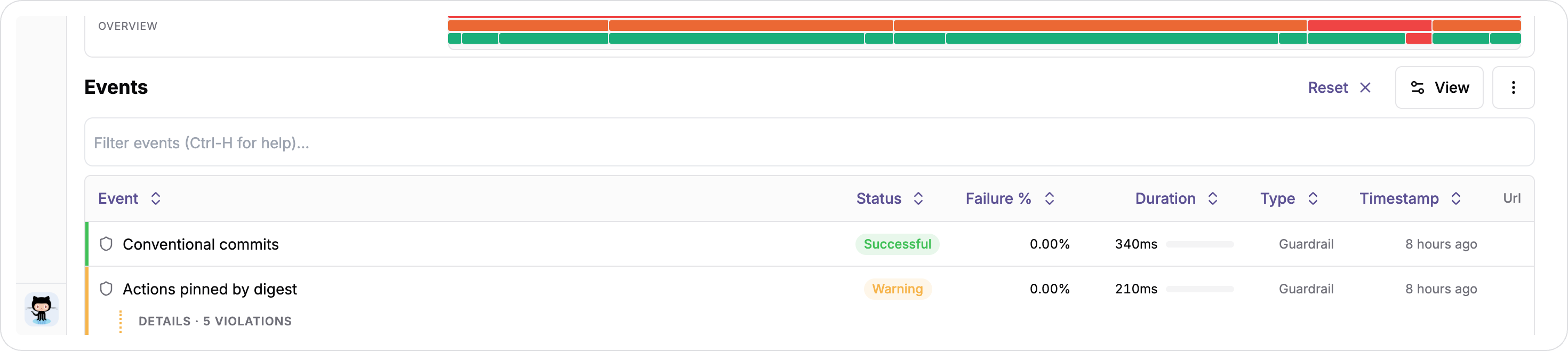
The run event is the invocation: one row carrying the total number of violations across the whole run and the highest severity that failed. Under it sits one check event per guardrail, each with its own verdict.
A failing guardrail does not take a flat failed status. It takes the status of its own severity, so an error guardrail fails the event, a warning lands on the warning status and an info on the info status, and the run takes the status of the worst severity that failed. That is what lets you read a run at a glance: red is something that stopped the build, amber is something that did not.
A guardrail that passed or skipped says nothing about its severity. A warning severity check that found nothing is simply successful.
One guardrail in detail
Click a check to open it. The sheet carries the guardrail's own verdict, how many violations it found, and the evidence for them.
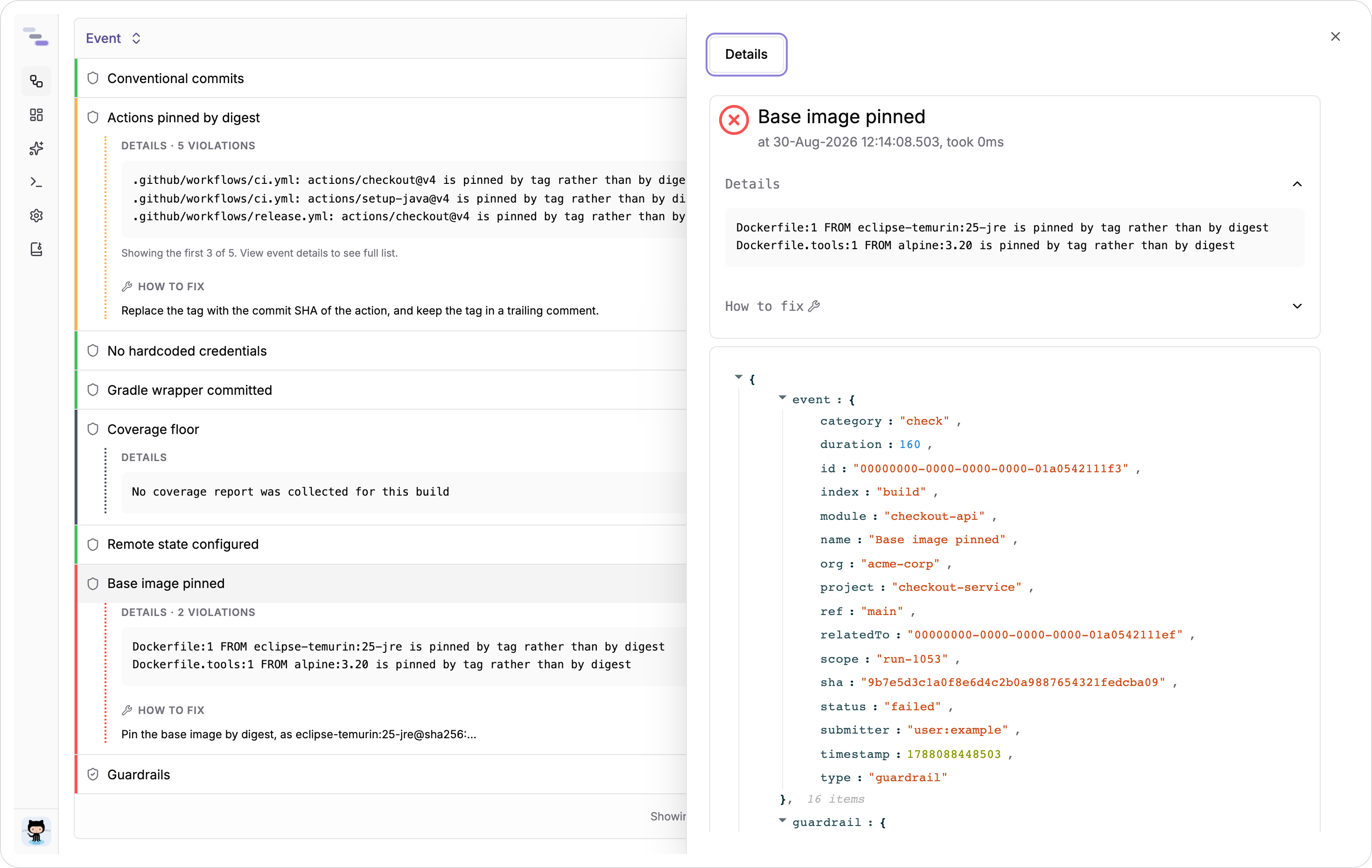
The evidence attribute holds only the first few violations, and the sheet says so when there are more. The complete list is the guardrail-violations.txt attachment on that check, one message per line, previewed in the sheet under the panels. That attachment is the record. Read it rather than the evidence lines when you want to know everything a guardrail found.
Failed checks also carry the guardrail's remediation, which is the definition's own advice on how to fix what it found.
What the run collected
Guardrails do not gather their own evidence. They declare collectors, which read the repository, the build and the reports it produced once per run, and hand the same document to every guardrail that asked for them.
That whole document is attached to the run event as guardrail-facts.json.
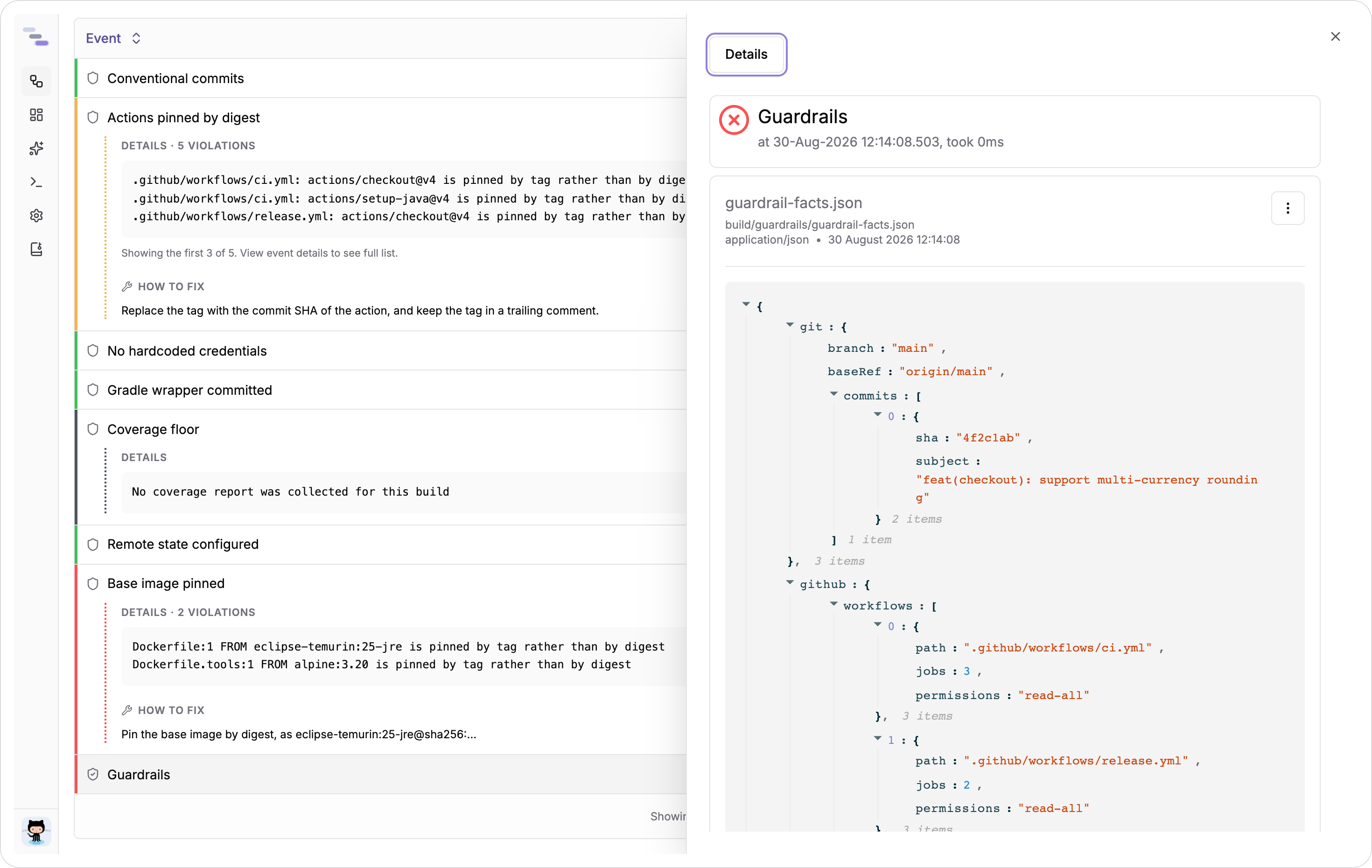
It is worth opening when a verdict surprises you. A guardrail can only be as right as what its collectors saw, and the facts document is exactly what they saw. A collector with nothing to say for your repository is left out of it entirely, so a Gradle only checkout carries no maven key, and a guardrail that asked for a collector reporting no source skips rather than failing.
Extract the report
The verdict table goes to the same reporters as buildnote report, configured in the report block of buildnote.json. Every one of them receives the same table, most severe first, with the evidence and remediation for each failed guardrail.
On the pull request
The GitHub reporter is on unless you turn it off. It writes the verdict table to the job summary and posts it on the pull request as a comment titled Guardrails. A re-run updates that comment rather than adding another, so a pull request holds one guardrail comment however many times CI runs.
Silence it, or stop only the comment while keeping the job summary:
{
  "report": {
    "github": {
      "enabled": true,
      "commentEnabled": false
    }
  }
}As a file you can keep
The HTML reporter writes a standalone document you can upload as a build artifact:
{
  "report": {
    "html": {
      "enabled": true,
      "outputFile": "build/reports/report.html"
    }
  }
}Guardrails never overwrite your test report. With an outputFile the guardrail document is written beside it as a -guardrails sibling, so build/reports/report.html gives build/reports/report-guardrails.html. With no outputFile at all it is buildnote-guardrails.html in the working directory.
Keep it from the workflow:
      - name: Guardrails
        run: buildnote guardrails

      - name: Upload the guardrail report
        uses: actions/upload-artifact@v4
        if: always()
        with:
          name: guardrails
path: build/reports/report-guardrails.htmlif: always() matters here. A gating guardrail fails the step, and without it the upload never runs on exactly the builds whose report you wanted.
To Slack and Discord
Both reporters post a notification with a line and a status icon per guardrail, and both take a condition so you only hear about the runs you care about:
{
  "report": {
    "slack": {
      "enabled": true,
      "url": "{{env.SLACK_WEBHOOK_URL}}",
      "condition": "{{failed}}"
    }
  }
}A condition is evaluated against the guardrail run rather than a test run, so failed, violations, total and the build coordinates are all available to it.
As data
The verdicts are queryable like anything else Buildnote stores. The guardrails table holds one row per guardrail per build:
SELECT guardrail, status, violations FROM guardrails WHERE build = '1053' AND category = 'check'Because a guardrail's identity is stable across builds, the interesting queries are the ones over time. Which rules fail most often, and are they trending down:
SELECT guardrail, COUNT(*) AS failures FROM guardrails WHERE status = 'failed' AND category = 'check' GROUP BY guardrail ORDER BY failures DESCRun these from Query, or put one on a dashboard so the trend sits beside the rest of your delivery metrics.
Roll it out without stopping anyone
Turning on a gate that fails builds on day one is how a guardrail gets removed in week two. Report first:
{
  "guardrails": {
    "failOn": "never",
    "checks": [
      {
        "use": "docker/base-pinned@v1"
      }
    ]
  }
}failOn: never records every verdict and posts every comment, and never fails the build. Leave it there long enough to see the trend, fix what it found, then move to failOn: error.
The same move works one guardrail at a time. Set a rule's severity to warning and keep failOn at error: the guardrail reports, the build survives, and promoting it later is a one word change.
Hold one module to account
A repository carrying several services does not want one list of guardrails for all of it. A policy is the same guardrails block in a file of its own, pointed at the directories it covers:
{
  "name": "checkout",
  "moduleId": "checkout",
  "paths": [
    "services/checkout",
    "services/checkout-worker"
  ],
  "guardrails": {
    "failOn": "error",
    "checks": [
      {
        "use": "docker/base-pinned@v1"
      }
    ]
  }
}buildnote guardrails --policy policies/checkout.jsonEach path is a working directory rather than a filter, so every collector runs once per path and a check reads the module it is held to rather than the repository root. A run over several paths still reports one verdict, carrying every path's violations, each located by the path it was found in.
Because a policy submits under its own moduleId, a job running several of them keeps their events, their pull request comments and their reports apart. See Policies for the whole shape.
Where to go next
- The guardrail library, to browse all of them
- Configuring guardrails, for every option
- The
buildnote guardrailscommand, for every flag - Writing a guardrail, when the library has no rule for what your team has agreed